
How to Use ChatGPT to Study Smarter
Studying effectively is not always about spending more hours with your books. In many cases, the key is knowing how to learn, revise, organize information, and identify areas where you need more practice. This is where ChatGPT can become a useful study companion. If you know how to use ChatGPT to study smarter, you can turn difficult topics into simpler explanations, create personalized quizzes, generate revision plans, practice questions, and get instant feedback on your learning process.
ChatGPT should not replace textbooks, teachers, classroom discussions, or your own thinking. Instead, it can support your existing study routine by helping you work through information more efficiently. Whether you are preparing for school exams, university assignments, professional certifications, or learning a new subject independently, the right prompts can make your study sessions more structured and interactive.
The most effective approach is to treat ChatGPT as a learning assistant rather than an answer machine. Ask it to explain concepts, challenge your understanding, test your knowledge, and help you discover mistakes. When used this way, ChatGPT can make studying more active and personalized.
1. Understand How ChatGPT Can Help You Study
Before exploring how to use ChatGPT to study smarter, it is important to understand what the tool can actually do. ChatGPT can explain concepts, summarize information, create practice questions, generate flashcards, help organize study schedules, and simulate different learning activities.
For example, imagine you are studying photosynthesis and find the textbook explanation difficult to understand. Instead of simply asking ChatGPT for the answer, you could ask:
“Explain photosynthesis to me as if I am a beginner. Use a simple example and then ask me three questions to check my understanding.”
This creates an interactive learning experience.
You can also ask ChatGPT to change its explanation based on your needs. If the first explanation is too complicated, request a simpler version. If it is too basic, ask for a more advanced explanation. You can even ask for analogies, examples, comparisons, or step-by-step explanations.
The goal is not simply to obtain information quickly. The goal is to use AI to make the learning process more active.
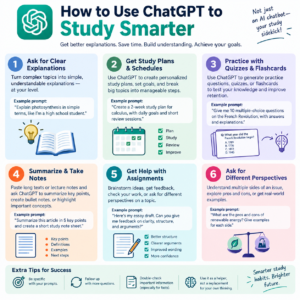
2. Turn Difficult Topics Into Simple Explanations
One of the most useful ways to learn how to use ChatGPT to study smarter is by using it to simplify difficult concepts.
Academic subjects often contain terminology that makes topics appear more complicated than they actually are. ChatGPT can help break those topics into smaller pieces.
For example, instead of asking:
“What is quantum mechanics?”
you could ask:
“Explain the basic idea of quantum mechanics using simple language, then give me an everyday analogy.”
After reading the explanation, continue with follow-up questions such as:
- “What is the most important idea I should remember?”
- “What are the three key terms?”
- “Give me an example.”
- “What mistakes do beginners commonly make?”
- “Now explain it at an advanced level.”
This approach allows you to gradually build understanding rather than trying to memorize a complicated paragraph.
You can use the same method for mathematics, history, economics, biology, programming, literature, business, and many other subjects.
3. Use ChatGPT as a Personal Tutor
A major advantage of ChatGPT is that you can interact with it through questions and follow-ups. This makes it possible to create a tutoring-style study session.
For example, you can tell ChatGPT:
“Act as my tutor. I am studying basic algebra. Teach me one concept at a time. After each explanation, give me a question. Do not provide the answer until I attempt it.”
This is a much more effective learning approach than asking ChatGPT to solve every problem immediately.
You can also establish rules for your study session. Tell ChatGPT to provide hints instead of answers, identify your mistakes, or ask questions that gradually increase in difficulty.
This encourages active participation. You have to think about the problem before receiving assistance.
When learning how to use ChatGPT to study smarter, this distinction is important. The more you participate in the learning process, the more useful the tool becomes.
4. Create Personalized Study Plans
A common problem students face is not knowing what to study first. A large syllabus can feel overwhelming, especially when an exam is approaching.
ChatGPT can help organize your available study time into a structured plan.
For example, provide information such as:
- Your exam date
- Subjects or chapters
- Number of hours available each day
- Topics you find difficult
- Topics you already understand
- Time available for revision
- Your preferred study style
You could then ask:
“Create a 14-day study plan for my biology exam. I have two hours available each weekday and four hours on weekends. Prioritize difficult topics and include daily revision and practice tests.”
Review the plan and adjust it according to your actual schedule.
A study plan generated by AI should be treated as a starting point, not a rigid schedule. Your energy levels, deadlines, classes, and progress can change. Update the plan whenever necessary.
5. Generate Practice Questions
One of the best ways to check whether you actually understand a topic is to answer questions without looking at your notes.
ChatGPT can generate practice questions based on a subject, chapter, difficulty level, or exam format.
For example:
“Create 15 multiple-choice questions about the causes of World War I. Do not show the answers until I respond.”
You can also request different question types, including:
- Multiple-choice questions
- Short-answer questions
- True-or-false questions
- Essay questions
- Problem-solving exercises
- Scenario-based questions
- Oral examination questions
After completing the questions, ask ChatGPT to evaluate your answers and explain your mistakes.
This makes studying more active because you are retrieving information from memory rather than simply rereading it.
6. Use ChatGPT for Active Recall
Active recall is a study technique in which you attempt to remember information without looking at the answer first. It can be more useful than repeatedly reading the same notes.
ChatGPT can help you create an active-recall session.
For example, after studying a chapter, tell ChatGPT:
“Quiz me on this topic one question at a time. Wait for my answer before giving feedback. Focus on concepts rather than memorization.”
You can make the questions progressively harder.
Start with basic questions such as:
“What is the definition of inflation?”
Then move to application:
“How might inflation affect consumers?”
Finally, use analysis:
“What factors could cause inflation to increase or decrease?”
This progression helps you move from remembering information to applying and analyzing it.
If you want to learn how to use ChatGPT to study smarter, active recall is one of the most practical techniques to incorporate into your routine.
7. Turn Your Notes Into Flashcards
Flashcards are useful for vocabulary, formulas, definitions, historical events, scientific terms, and other information that benefits from repeated recall.
You can provide your notes and ask ChatGPT to convert them into flashcards.
For example:
“Turn these notes into 30 flashcards. Put the question on one side and a concise answer on the other. Focus on the most important concepts.”
You can then practice the cards manually or transfer them into a flashcard application.
For better results, ask ChatGPT to avoid making every card a simple definition. Include conceptual and application-based questions too.
Instead of:
“What is supply?”
you could have:
“What can happen to supply when production costs increase?”
The second question requires you to understand the concept rather than simply recall a definition.
8. Ask ChatGPT to Explain Your Mistakes
Making mistakes is an important part of learning. However, simply knowing that an answer is wrong does not always explain why it is wrong.
ChatGPT can help analyze your reasoning.
For example, if you solve a mathematics problem incorrectly, provide your steps and ask:
“Review my solution. Identify the first step where my reasoning became incorrect. Explain the mistake without immediately giving me the final answer.”
This approach is particularly useful because it focuses on the process.
You can also ask:
“Give me a similar problem so I can try again.”
That allows you to immediately apply the correction.
For writing assignments, you can ask ChatGPT to identify unclear arguments, weak transitions, grammar problems, or unsupported claims while allowing you to make the revisions yourself.
The objective should be improvement, not simply obtaining a corrected answer.
9. Use ChatGPT for Exam Revision
As an exam approaches, your study strategy should shift from learning new material to reviewing and testing what you already know.
ChatGPT can help you create a revision checklist based on your syllabus.
For example:
“I have an exam covering five chapters. Create a revision checklist with key concepts, important definitions, common mistakes, and practice questions for each chapter.”
You can then work through the checklist systematically.
Another useful technique is to ask ChatGPT to simulate an examination.
“Create a 60-minute practice exam based on these topics. Include different question types and provide the marking criteria separately.”
Complete the exam without assistance. Afterwards, use ChatGPT to review your responses.
This can help you identify areas that deserve additional study before the actual exam.
10. Learn Through Socratic Questioning
If you want to develop stronger critical-thinking skills, ask ChatGPT to use the Socratic method.
Instead of giving you direct answers, ChatGPT can ask questions that encourage you to reason through the problem.
For example:
“Do not give me the answer immediately. Ask me questions that help me reach the conclusion myself.”
Suppose you are studying philosophy. Instead of asking ChatGPT to explain an argument, you can ask it to challenge your interpretation.
It might ask:
- What evidence supports your interpretation?
- What assumptions are you making?
- Is there another possible explanation?
- What would happen if your assumption were false?
- Can you provide an example?
- What objection could someone make?
This style of interaction can make studying more intellectually engaging.
It also helps prevent a common problem with AI-assisted learning: accepting information without critically examining it.
11. Use ChatGPT to Practice Writing
Students often need to write essays, reports, answers, presentations, and research summaries. ChatGPT can support the writing process without replacing your own work.
For example, you can ask it to help you brainstorm possible arguments for an essay topic.
You might say:
“Give me five possible arguments for an essay about the impact of social media on education. For each argument, provide questions I should investigate.”
You can then research the topic yourself and develop your own position.
ChatGPT can also review a draft for structure and clarity.
Instead of asking:
“Rewrite my entire essay.”
try:
“Identify the three weakest parts of my argument and explain how I could strengthen them.”
This encourages you to improve your own writing skills.
If your school or university has rules regarding AI use, always follow those requirements. Some assignments may allow AI-assisted brainstorming but prohibit AI-generated submissions.
12. Make Complex Subjects More Interactive
Some subjects become easier to understand when you connect theory with practical situations.
You can ask ChatGPT to create scenarios related to what you are learning.
For example, if you are studying business:
“Create a fictional business scenario where I need to decide how to respond to declining sales. Ask me questions one at a time and evaluate my reasoning.”
For programming:
“Give me a beginner coding problem. Let me attempt the solution first, then provide hints rather than the complete code.”
For language learning:
“Have a beginner conversation with me in Spanish. Correct only major mistakes and explain them after each response.”
Interactive exercises can make study sessions feel less repetitive and give you opportunities to apply theoretical knowledge.
13. Learn How to Write Better Study Prompts
The quality of your interaction with ChatGPT depends heavily on how clearly you communicate what you need.
A vague prompt might be:
“Explain economics.”
A more useful prompt would be:
“I am a beginner studying economics for an upcoming exam. Explain opportunity cost in simple language, provide two everyday examples, then give me five questions to test my understanding.”
The second prompt provides context, difficulty level, learning objective, and desired format.
A useful prompt structure is:
Context + Task + Level + Format + Learning Goal
For example:
“I am a first-year university student studying biology. Explain cellular respiration at an intermediate level using a step-by-step structure. Then give me five application questions without answers.”
You can reuse this structure across different subjects.
Learning how to use ChatGPT to study smarter therefore includes learning how to communicate effectively with the tool.
14. Avoid Using ChatGPT as an Answer Machine
Although ChatGPT can provide answers quickly, copying those answers does not necessarily mean you have learned the material.
If you are stuck on a mathematics problem, for example, asking for the final answer may save time but remove an opportunity to practice.
Instead, try:
“Give me the first hint.”
If you are still stuck:
“Give me another hint, but don’t solve it for me.”
Only after attempting the problem should you ask for a complete explanation.
The same principle applies to essays and research.
Use ChatGPT to support your thinking rather than outsource all of it.
You should also remember that AI systems can sometimes produce inaccurate or incomplete information. For important academic topics, verify facts using your textbook, class materials, reputable academic sources, or your instructor.
15. Build a Smarter Daily Study Routine
The best way to benefit from ChatGPT is to incorporate it into a consistent routine rather than using it randomly.
A simple 60-minute study session could look like this:
First 10 minutes: Review your previous material.
Next 15 minutes: Ask ChatGPT to explain one difficult concept.
Next 15 minutes: Complete active-recall questions.
Next 10 minutes: Work through practice problems without assistance.
Final 10 minutes: Ask ChatGPT to quiz you on what you studied.
At the end of the session, write down three things you learned and one topic that still needs attention.
You can then use that information to plan your next session.
Over time, this approach creates a feedback loop: learn, practice, identify weaknesses, review, and test again.
16. Check Information Before You Trust It
Learning how to use ChatGPT to study smarter also means understanding its limitations.
ChatGPT can sometimes make factual errors, misunderstand a question, provide outdated information, or present an explanation that sounds convincing but is incorrect.
This is particularly important for subjects where precision matters.
When studying, verify important information against trusted sources. For academic research, use your assigned textbooks, university resources, peer-reviewed research, official organizations, and other reliable references where appropriate.
You should also be cautious when asking ChatGPT to generate citations. Do not assume that a citation is genuine simply because it looks academic. Check the original source before using it in an assignment.
Think of ChatGPT as a study assistant that can help you explore ideas, not as an unquestionable authority.
17. Create a Personalized Learning System
Once you understand how to use ChatGPT to study smarter, you can combine several techniques into one personalized learning system.
For example, your weekly routine could include:
Monday: Learn new concepts and ask for simple explanations.
Tuesday: Practice problems and identify mistakes.
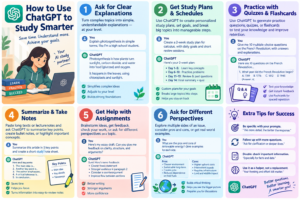
Wednesday: Use flashcards and active recall.
Thursday: Complete application-based questions.
Friday: Take a short practice test.
Saturday: Review weak areas.
Sunday: Take a larger practice exam and plan the next week.
You can ask ChatGPT to help organize each stage while keeping yourself responsible for the actual learning.
The more specific your study goals are, the more useful your prompts become.
Instead of saying, “Help me study chemistry,” define exactly what you want to accomplish:
“I need to understand chemical bonding well enough to answer intermediate exam questions by Friday. Help me create a four-day learning and practice plan.”
That gives ChatGPT a clear objective.
Conclusion: Use ChatGPT to Learn, Not Just to Get Answers
Learning how to use ChatGPT to study smarter is ultimately about changing the way you interact with information. Instead of using AI only to search for quick answers, use it to ask questions, test your knowledge, identify mistakes, practice difficult concepts, and create structured study sessions.
You can use ChatGPT as a personal tutor, quiz creator, brainstorming partner, revision assistant, writing coach, and practice examiner. The most valuable feature is not simply that it can produce information quickly. It is that you can interact with the information, ask follow-up questions, and adapt explanations to your learning needs.
At the same time, effective studying still requires your own effort. Read your course materials, solve problems independently, think critically, verify important information, and follow your school’s or institution’s AI policies.
The smartest approach is to combine your own thinking with the strengths of AI. When used responsibly, ChatGPT can help make study sessions more organized, interactive, and personalized—and that is the real value of learning how to use ChatGPT to study smarter.